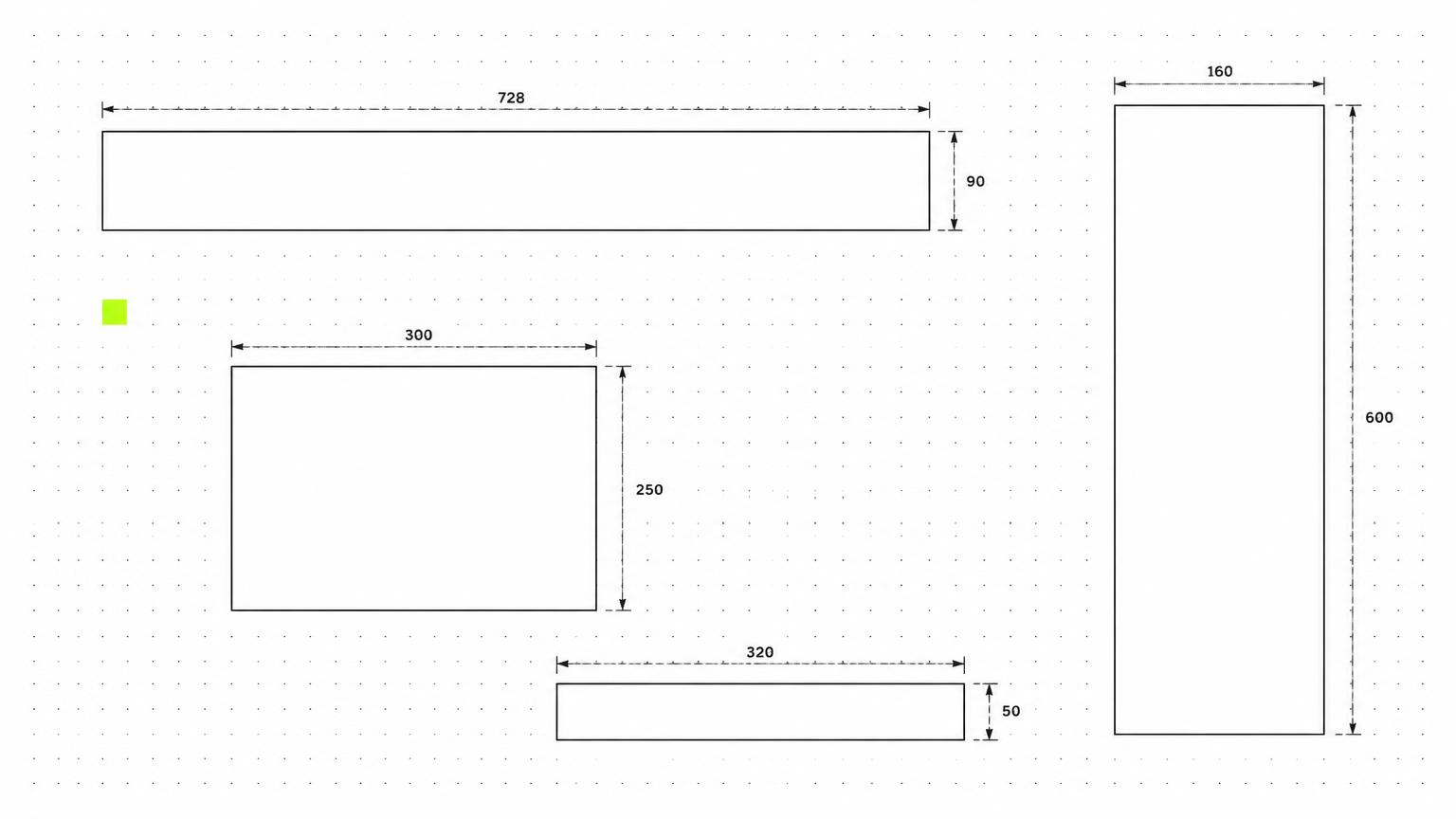
The most important HTML5 banner formats for your 2026 media planning remain established sizes such as 300 × 250, 300 × 600 and 728 × 90, along with mobile formats such as 320 × 50. The right combination depends on your audience, inventory and campaign objective, complemented by special formats for high-impact placements and native ads tailored to their surroundings.
Which HTML5 banner formats are relevant in 2026?
There is no universal list of formats for every campaign. Publishers, ad sales partners and buying platforms support different sizes and technical implementations. For a campaign in Austria or Germany, your actual media plan therefore matters more than producing the largest possible set of assets.
Distinguish between three categories when planning:
- Standard formats: Fixed dimensions for conventional display placements on desktop and smartphones.
- Special formats: Larger, combined or interactive ad formats with specific requirements set by the publisher or technology provider.
- Native ads: Ads built from individual assets, with an appearance that adapts to the surrounding content.
Important: Pixel dimensions only describe the outer size. They tell you nothing about file size, animation, click handling or the actual availability of a placement.
Standard formats: Sizes and recommended uses
The following overview shows common display sizes. Dimensions are given as width × height in pixels. You also need to check whether HTML5 is permitted for each placement.
| Format | Size | Typical use | Recommendation |
|---|---|---|---|
| Medium Rectangle | 300 × 250 | Desktop and mobile content placements | A versatile starting point for concise messages |
| Large Rectangle | 336 × 280 | Larger content placements | An addition where inventory is explicitly confirmed |
| Leaderboard | 728 × 90 | Horizontal desktop placements | For short headlines and clear brand visibility |
| Large Leaderboard | 970 × 90 | Wide desktop spaces | For horizontal imagery with minimal text |
| Billboard | 970 × 250 | Large desktop placements | For product showcases and explanatory sequences |
| Halfpage | 300 × 600 | Tall desktop spaces, often at the side | For vertical storytelling and larger product images |
| Wide Skyscraper | 160 × 600 | Narrow desktop sidebar spaces | For a stripped-back, vertical design |
| Mobile Banner | 320 × 50 | Small mobile ad spaces | For a single, immediately clear message |
| Large Mobile Banner | 320 × 100 | Taller mobile banner placements | For a stronger visual hierarchy on smartphones |
Which sizes belong in your starter set?
For a media plan covering both desktop and mobile, Medium Rectangle, Halfpage, Leaderboard and suitable mobile sizes often provide a sensible starting point. This is a planning guideline, not a guarantee of complete inventory coverage.
Before production begins, confirm which formats can actually be booked and which cover a meaningful share of the planned inventory. This helps you avoid producing variants that will rarely be used. In HTML5 banner production, format selection, design and technical specifications should therefore be considered together.
Why the Medium Rectangle is often a practical choice
Its aspect ratio provides room for a product, headline and call to action without requiring an extremely horizontal or vertical design. The size also appears in both desktop and mobile environments.
Even so, this format still requires clear priorities. You cannot keep adding offers, lengthy explanations and extensive mandatory information without affecting readability.
Mobile and desktop need different layouts
Simply shrinking a desktop banner does not make it an effective mobile format. At 320 × 50 in particular, there is little room for text and imagery. A clear core message matters more here than a complete product story.
Mobile: Keep the message focused
For small mobile formats:
- Use a short headline with a clear benefit.
- Show only the essential visual elements.
- Keep the logo and call to action clearly visible.
- Check the design at its actual size on a smartphone.
- Account for required notices in the layout from the start.
If a message cannot fit legibly into the available space, you need a different layout, a shorter message or a larger format. Smaller text usually does not solve the problem.
Desktop: Use the space purposefully
A Billboard provides room for strong imagery. A Halfpage suits a vertical structure featuring the product, a key benefit and a call to action. A Leaderboard, by contrast, requires a compact horizontal arrangement.
Develop layout families rather than a single template for every size. Landscape formats, portrait formats and compact rectangles should express the same campaign concept, but each should be designed to suit its available space.
Special formats: More possibilities, more coordination
Special formats can support distinctive brand presentations, interaction or particularly prominent placements. However, their names and technical requirements are not consistent across providers.
Wallpaper, Sitebar and large-format combinations
Wallpaper formats often consist of several coordinated ad spaces around editorial content. Sitebars use areas at the side of the page and, depending on the technical implementation, can adapt to the available space.
These formats are not necessarily a single HTML5 banner with fixed outer dimensions. In some cases, a publisher template handles the positioning of multiple assets. Before starting the design, check:
- Which individual files or assets are required?
- Which areas are visible and clickable?
- How does the format change at different window sizes?
- What fallback display is planned?
Interactive and expandable ad formats
Interactive banners can offer features such as product selection or switching between views. Expandable formats open a larger area under defined conditions. Both require suitable inventory and a supported technical implementation.
Only plan these formats if the interaction provides a specific benefit. For a simple promotional message, a clearly designed standard format may be the better solution. Special formats also require sufficient time for coordination, testing and approvals.
Native ads: Not another fixed banner size
Native ads are generally not HTML5 ZIP packages with specific pixel dimensions. You typically supply imagery, a headline, a description, brand details and a destination URL. The relevant system places these components into the placement's layout.
Requirements therefore often concern image aspect ratios, minimum dimensions and text lengths rather than a single fixed banner size. The applicable specifications depend on the network and publisher.
When native ads are a useful addition
Native ads can be suitable when your campaign benefits from an explanatory headline and a relevant image. This applies, for example, to guides, services or offers that need more explanation.
Prepare your visuals to allow for different crops. Important image content should not appear only at the edges. Native ads complement conventional display banners, but do not replace their technical specifications or design concept.
Clarify technical requirements in advance
The right dimensions alone do not make an ad ready to serve. Request the current specifications for each platform and clarify the following in particular:
- File size: What limits apply to the initial load and any content loaded afterwards?
- Package structure: How must HTML, images, fonts and scripts be supplied?
- Click handling: Which clickTag or platform-specific implementation is required?
- Animation: What rules apply to duration, loops and the final frame?
- External resources: Are libraries, fonts or other files loaded afterwards permitted?
- Fallback: Is an additional static fallback file required?
Then test the display, click functionality and animation in the intended environments. Platform validation does not fully replace visual quality checks.
Dynamic campaigns add another layer: Text, prices and images can change. For Dynamic Creative Optimization (DCO), you therefore need layout rules that can accommodate longer product names and different visuals. Tracking, data processing and any required notices should undergo separate technical and legal review.
How to build your format package
Start with your objective and media plan, not a long wish list of sizes. A practical process is:
- Clarify inventory: Define publishers, platforms and the device mix.
- Identify required formats: Gather the sizes and specifications you actually need.
- Develop layout families: Design mobile, horizontal and vertical variants separately.
- Assess additional formats: Select special formats and native ads based on their contribution to the campaign.
- Plan production and testing: Account for language versions, offer changes and approvals.
To estimate the workload, group your selected sizes and variants before commissioning HTML5 banners. What matters is not the largest possible number of formats, but a suitable, thoroughly tested package.
Frequently asked questions
Which HTML5 banner formats should I produce first?
Start with the confirmed sizes in your media plan. Common choices include 300 × 250, 300 × 600, horizontal desktop banners and mobile banners. Until inventory has been checked, any selection remains provisional.
Can a responsive HTML5 banner cover all sizes?
Not automatically. A responsive banner can adapt within supported placements. Many bookings still require fixed sizes or separate files. The design also needs to work across different aspect ratios.
Are native ads and HTML5 banners technically the same?
No. Conventional HTML5 banners deliver a designed ad space with defined behaviour. Native ads are usually assembled by the platform from individual assets. Production and approval processes therefore differ.
Define your inventory and required formats first, then develop suitable layout families. If you would like to plan your format package for 2026, use a 45-minute consultation with artworx to clarify sizes, variants and technical requirements before production begins.